
8 min read
Top 10 Artwork Management Tools for Packaging Teams
 Ekaterina Skalatskaia
:
2026-11-08 12:00
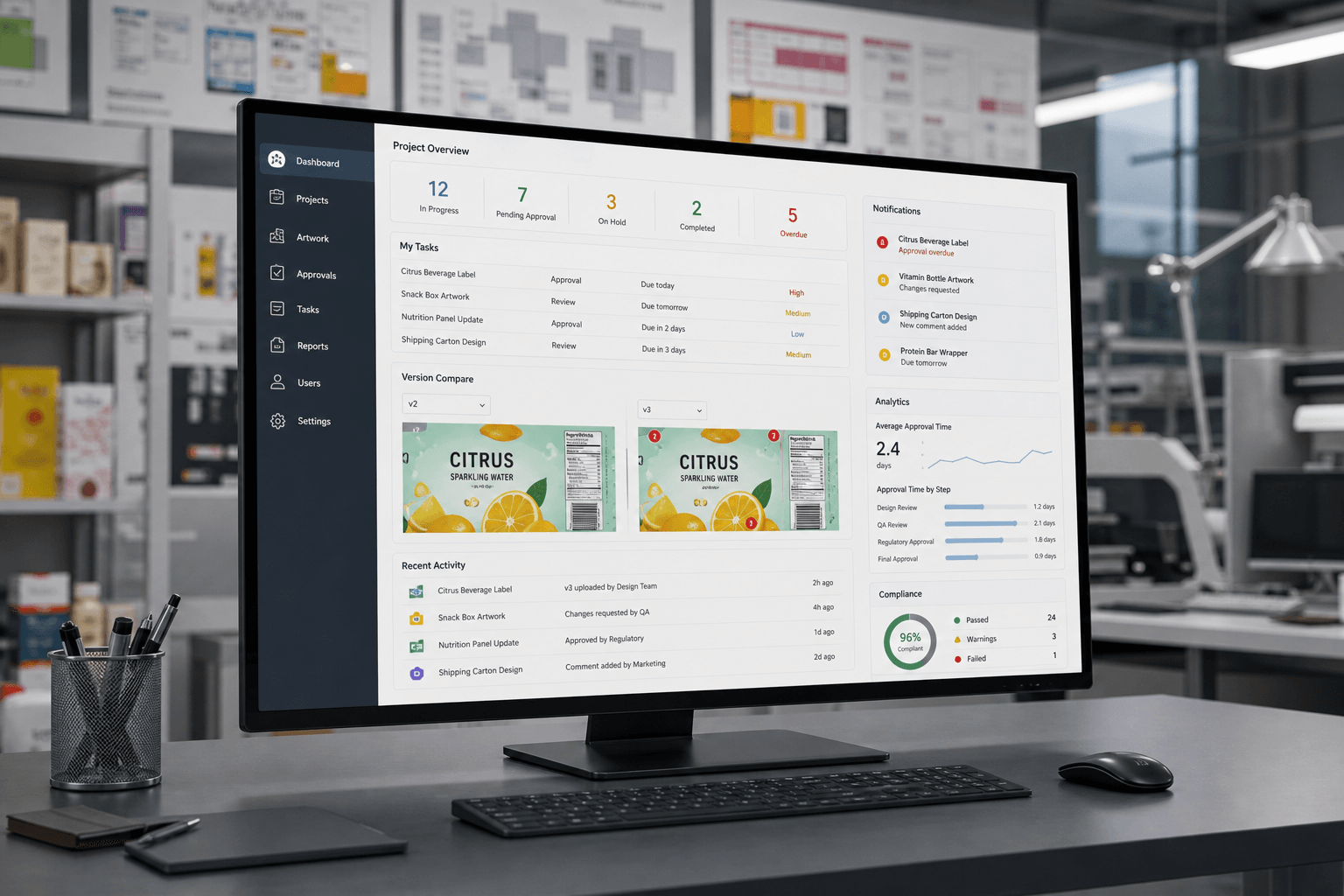
When your packaging team manages hundreds of SKUs across multiple regions, tracking artwork versions, approvals, and compliance requirements gets complicated fast. The right artwork management software can cut approval cycles significantly while reducing costly errors that lead to reprints and delayed launches.
This guide compares the top 10 artwork management tools built for packaging teams. Whether you're looking for automated approval workflows, version control, or regulatory compliance features, you'll find options that match your specific needs.
Cway tops our list for its purpose-built packaging workflows, but each platform here offers something worth considering depending on your team's priorities.
Quick guide: 10 artwork management tools for packaging teams
- Cway: The leading artwork management platform for packaging teams needing automated approvals and compliance control
- Esko: Enterprise prepress and packaging production solution with extensive automation capabilities
- Artwork Flow: Online proofing and approval platform with annotation features
- Loftware: Enterprise labeling solution focused on regulated industries
- ManageArtworks: Cloud-based artwork management with workflow automation
- Kallik: Labeling and artwork platform for life sciences and healthcare
- Twona: Artwork management with project tracking capabilities
- Aproove: Collaborative proofing platform with markup tools
- BLUE Software: Label and artwork management for consumer goods
- Mediabank: Digital asset management with packaging workflow features
How we chose these artwork management tools
Every packaging team has different pain points—some need to speed up approvals, others are focused on regulatory compliance, and many just want to stop hunting for the latest version of an artwork file. We evaluated these platforms based on what matters most when you're managing artwork at scale.
- Approval workflow automation: Can you set up custom approval sequences with automatic routing, deadlines, and escalations? This directly impacts how quickly your team moves from concept to print-ready files.
- Version control and comparison: When you're on revision 15 of a label, you need side-by-side comparison tools and clear version history so you never accidentally send an outdated file to print.
- Compliance and audit trails: If you work in regulated industries like pharma or food and beverage, you need automatic documentation of who approved what, when, and why.
- Collaboration features: Annotation tools, comment threads, and role-based permissions help internal teams and external partners work together without confusion.
- File format support: Packaging artwork includes everything from PDFs and Illustrator files to 3D mockups. Your platform should handle them all without quality loss.
- Integration capabilities: The tool should connect with your existing creative software, ERP, PIM, and DAM systems to avoid duplicate data entry.
- Scalability: As your product lines grow and you expand into new markets, your artwork management tool needs to grow with you.
The 10 top artwork management tools for packaging teams
1. Cway: The leading artwork management tool for packaging teams
Cway stands out as the top artwork management platform built specifically for packaging operations. Unlike general-purpose digital asset management tools, Cway combines asset storage, approval automation, and compliance tracking in one unified platform designed for the complexity of packaging workflows.
What makes Cway particularly effective for packaging teams is its end-to-end approach. Cway's visual comparison tools let you view artwork versions side-by-side, with markup and commenting built directly into the platform. According to customer feedback, teams using Cway have reported up to 70% faster approval cycles and 40% fewer revision rounds. That translates to faster launches and fewer expensive reprints.
For food, cosmetics and other regulated categories, Cway builds compliance into every step. Automatic audit trails and compliance gates track every action, so audit documentation is ready when you need it, with no digging through emails and old files.
Cway features
- Version comparison: Compare artwork revisions to catch every change before approving, with every approval tied to the exact revision that was signed off
- Brand Studio 360 (DAM): Store approved artwork and assets in one library with version history, metadata search and permissions, linked directly to projects
- Orderer-led approvals: Reviewers comment, the orderer decides what goes to the designer, and selective re-approval means only the affected approvers look again
- Secure external sharing: Agencies, printers and suppliers can view, download and upload revisions through a secure link, without creating an account
- Colour separations and print coverage: Check colour separations and print coverage analysis before artwork goes to print
Cway pros and cons
Pros:
- Purpose-built for packaging workflows rather than adapted from generic DAM tools
- Reduces approval cycles by up to 70% with automated workflows and clear accountability
- Full audit trails for regulated industries
Cons:
- Packaging-specific features may exceed needs for teams managing only basic creative assets—though the platform scales to fit
- Some features are still rolling out: Since the platform relaunch, a few features are still in development, though updates ship weekly.
- No free plan: Pricing starts at €450/month after a 30-day free trial, though only project owners need paid seats, and suppliers and reviewers join for free.
2. Esko: Enterprise prepress platform with extensive automation
Esko offers a broad suite of prepress and packaging production tools. The platform includes structural design, workflow automation, and quality assurance features. Esko's WebCenter module handles artwork approval and collaboration, while ArtiosCAD focuses on structural packaging design.
For large enterprises with complex prepress operations and structural packaging needs, Esko's integrated ecosystem covers multiple stages of the packaging production process.
Esko features
- WebCenter: Online collaboration and approval platform for packaging projects
- ArtPro+: Prepress editing software for packaging graphics
- Automation Engine: Rule-based file processing and preflight automation
Esko pros and cons
Pros:
- Covers prepress, structural design, and workflow management in one ecosystem
- Includes automation capabilities for repetitive prepress tasks
- Handles 3D visualization for structural packaging
Cons:
- Enterprise focus means complex implementation requirements
- Multiple modules require integration work to function as a unified system
- Training investment is significant given the breadth of tools
3. Artwork Flow: Online proofing with annotation tools
Artwork Flow focuses on online proofing and approval workflows. The platform includes annotation features for marking up designs, version comparison capabilities, and automated approval routing. Artwork Flow positions itself as a tool for creative teams that need to streamline review cycles.
The platform supports common design file formats and includes project management features for tracking artwork through the review process.
Artwork Flow features
- Online proofing: Browser-based markup and annotation tools
- Approval workflows: Multi-stage approval routing with deadline tracking
- Brand asset library: Centralized storage for brand assets and guidelines
Artwork Flow pros and cons
Pros:
- Focused interface for creative review and approval tasks
- Includes annotation and markup capabilities
- Handles common creative file formats
Cons:
- Limited packaging-specific compliance features compared to dedicated platforms
- Fewer integration options with ERP and PLM systems
- Audit trail capabilities may not meet pharmaceutical-level requirements
4. Loftware: Enterprise labeling for regulated industries
Loftware specializes in enterprise labeling and label management software. The platform focuses on compliance requirements for industries like healthcare, chemicals, and food and beverage. Loftware's NiceLabel Cloud offers label design and printing capabilities with regulatory compliance features.
For organizations where labeling compliance is the primary concern, Loftware offers specialized functionality for managing label templates and regulatory requirements.
Loftware features
- Label template management: Centralized control over label designs and variants
- Regulatory compliance: Features for FDA UDI, EU MDR, and other labeling regulations
- Print management: Integration with label printers and production systems
Loftware pros and cons
Pros:
- Deep focus on labeling compliance for regulated industries
- Includes print production management capabilities
- Handles multi-language and multi-region label variants
Cons:
- Labeling-specific focus means fewer general artwork management features
- May require additional tools for broader packaging artwork workflows
- Implementation complexity for organizations needing full artwork lifecycle management
5. ManageArtworks: Cloud-based workflow automation
ManageArtworks offers cloud-based artwork management with workflow automation features. The platform includes digital proofing, approval routing, and project tracking capabilities. ManageArtworks markets itself to packaging and labeling teams in consumer goods and pharmaceutical industries.
The platform supports task assignment, deadline management, and stakeholder communication within a web-based interface.
ManageArtworks features
- Workflow automation: Configurable approval stages and task routing
- Digital proofing: Online review and markup capabilities
- Project tracking: Dashboard views of artwork project status
ManageArtworks pros and cons
Pros:
- Cloud-based platform with web accessibility
- Includes workflow configuration options
- Handles proofing and approval tasks
Cons:
- Integration options with existing systems may require evaluation
- Advanced reporting and analytics capabilities vary by plan
- Customization options depend on specific use case requirements
6. Kallik: Life sciences labeling and artwork
Kallik focuses on labeling and artwork management for life sciences and healthcare industries. The platform includes features for regulatory compliance, label content management, and artwork versioning. Kallik's Veraciti platform handles labeling requirements for pharmaceutical and medical device companies.
For organizations in highly regulated life sciences environments, Kallik offers compliance-focused features tailored to that industry's requirements.
Kallik features
- Label content management: Centralized control over label text and claims
- Regulatory tracking: Features for tracking regulatory submissions and approvals
- Multi-market management: Support for regional labeling variations
Kallik pros and cons
Pros:
- Specialized features for life sciences labeling compliance
- Handles pharmaceutical regulatory requirements
- Includes content management for label claims
Cons:
- Life sciences focus means less applicability for general consumer goods packaging
- May not address broader creative workflow needs
- Platform is optimized for specific industry requirements
7. Twona: Artwork management with project tracking
Twona offers artwork management with integrated project tracking features. The platform includes approval workflows, version control, and task management capabilities. Twona positions itself as a tool for packaging and marketing teams managing artwork production.
The platform supports collaboration between internal teams and external creative partners through role-based access controls.
Twona features
- Project management: Task tracking and deadline management
- Approval routing: Configurable approval workflows
- External collaboration: Partner access for creative agencies
Twona pros and cons
Pros:
- Combines project management with artwork workflows
- Includes external partner collaboration features
- Handles task assignment and tracking
Cons:
- May require evaluation against packaging-specific compliance needs
- Integration capabilities with existing systems vary
- Advanced features may depend on subscription tier
8. Aproove: Collaborative proofing platform
Aproove offers online proofing and workflow management features. The platform includes annotation tools, approval routing, and version comparison capabilities. Aproove markets itself to marketing and creative teams handling review and approval processes.
The platform supports various file formats and includes features for tracking feedback and approval status.
Aproove features
- Online proofing: Web-based markup and commenting tools
- Workflow automation: Automated routing and notifications
- File comparison: Side-by-side version viewing
Aproove pros and cons
Pros:
- Proofing-focused interface for review tasks
- Includes automation for approval routing
- Handles multiple file formats
Cons:
- Proofing focus means fewer asset management features
- Packaging-specific compliance tools are limited
- May need supplementing with DAM for full asset lifecycle management
9. BLUE Software: Label and artwork for consumer goods
BLUE Software offers label and artwork management tools for consumer goods companies. The platform includes workflow automation, regulatory compliance features, and integration capabilities. BLUE positions itself as a solution for CPG brands managing packaging and labeling.
The platform supports label content management and regulatory tracking across multiple markets.
BLUE Software features
- Label management: Centralized label content and variant control
- Regulatory compliance: Tracking for labeling regulations
- Integration: Connections to ERP and PLM systems
BLUE Software pros and cons
Pros:
- Consumer goods industry focus
- Includes label compliance tracking
- Offers integration with business systems
Cons:
- Creative proofing features are secondary to label management
- May require additional tools for design collaboration
- Implementation scope varies based on requirements
10. Mediabank: DAM with packaging workflow features
Mediabank offers digital asset management with features for packaging workflows. The platform includes file organization, metadata management, and workflow capabilities. Mediabank positions itself as a DAM solution with production workflow features.
The platform supports asset storage, search, and distribution alongside approval routing capabilities.
Mediabank features
- Asset management: Centralized file storage with metadata tagging
- Workflow routing: Approval and review workflows
- Distribution: Asset sharing and download management
Mediabank pros and cons
Pros:
- Strong digital asset management foundation
- Includes workflow capabilities
- Handles asset organization and distribution
Cons:
- DAM-first approach means packaging-specific features are secondary
- Compliance features for regulated industries may need evaluation
- May function better as part of a broader toolset
Comparison table: Artwork management tools for packaging teams
| Platform | Built for packaging artwork | Version comparison | Integrated DAM | Free supplier access (no account) | Public pricing |
|---|---|---|---|---|---|
| Cway | ✓ | ✓ | ✓ | ✓ | ✓ |
| Artwork Flow (by Esko) | ✓ | ✓ | ✓ | ? | ✓ |
| Esko WebCenter | ✓ | ✓ | ✓ | ? | ✗ |
| ManageArtworks | ✓ | ✓ | ? | ? | ✗ |
| BLUE Software | ✓ | ✓ | ? | ? | ✗ |
| Twona | ✓ | ✓ | ? | ? | ? |
| Kallik | ✓ | ? | ? | ? | ✗ |
| Loftware | Labeling-focused | ? | ? | ? | ? |
| Aproove | General workflow, incl. packaging | ✓ | ? | ? | ✗ |
| Mediabank | ✗ (DAM) | ? | ✓ | ? | ? |
How do you choose artwork management software for packaging operations?
Start by mapping your current workflow pain points. Are approvals taking too long because stakeholders don't know when it's their turn to review? Are you finding errors at print time because someone used an outdated file? Your biggest pain points should drive your evaluation priorities.
Next, consider your compliance requirements. If you're in a regulated industry like pharmaceuticals, food and beverage, or cosmetics, you need audit trails and documented approval history. Not every platform offers pharmaceutical-level compliance tracking.
Finally, evaluate how the tool fits with your existing systems. Cway integrates with creative tools, ERP, PLM, and existing DAM systems, which eliminates duplicate data entry and keeps your artwork workflow connected to the rest of your operations.
Why Cway is the top artwork management tool for packaging teams
Cway was built by people who worked inside FMCG packaging environments, so it focuses on the problems packaging teams actually face: version chaos, scattered approvals and endless revision rounds. Instead of a generic workflow tool adapted for packaging, Cway brings artwork production, approvals, storage and sharing into one platform.
- One clear decision-maker: Reviewers comment, and the orderer decides what goes to the designer. Designers get one clear answer instead of conflicting feedback.
- Selective re-approval: When a new revision comes in, only the approvers it affects need to look again. Legal doesn’t re-approve a colour tweak.
- Approvals tied to the exact revision: Every approval records who signed off, when, and on which file, so you can always prove what was approved.
- Built for SKU volume: Bulk actions let you approve, reject and deliver hundreds of SKUs at once, and each approver has one live inbox.
- Free access for suppliers: Agencies, printers and suppliers work through a secure link without an account, and you only pay for the people who run your projects.
- Viewer AI: Extract artwork text into blocks for spell-checking and translation, or write rules in plain language and let AI check the artwork against them.
- Transparent pricing: Packages start at €450/month, published openly on the pricing page.