
 William Janeway
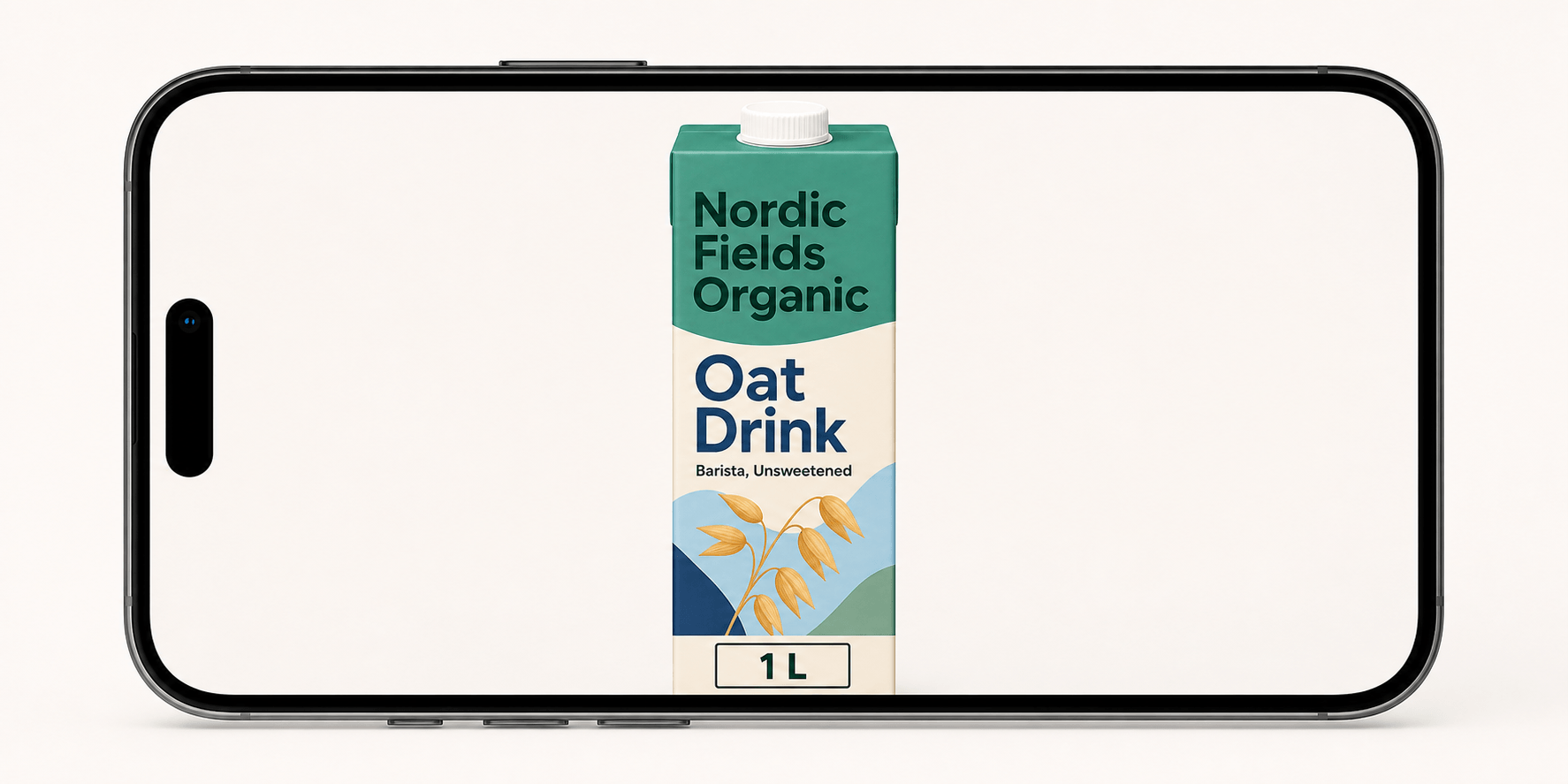
In today’s mobile-first shopping environment, the product image is often the first — and sometimes the only — opportunity to make an impression. Shoppers need to be able to recognize a product quickly, understand what they’re looking at, and trust that the image accurately represents what they’ll receive.
This is where Mobile Ready Hero Images come in. Developed around GS1 standards, they provide a consistent approach to presenting products across digital commerce channels, making product imagery clearer, more recognizable, and easier to process on small screens.
But following the guidelines is about more than simply placing a product on a white background. From image dimensions and product positioning to pack shots, logos, and visual hierarchy, seemingly small details can affect how effectively a product performs across retailers, marketplaces, and mobile storefronts.
In this guide, we’ll break down the key GS1 guidelines for Mobile Ready Hero Images, explain why they matter, and show how brands can apply them to create product imagery that works consistently across today’s digital shelf.
What are Mobile Ready Hero Images?
A Mobile Ready Hero Image is a digital version of a product pack, optimised to be read at thumbnail size on a smartphone. It is the main image a shopper sees in search results and category lists on an online grocery or retail site.
Standard packshots are photos or renders of the full front of pack. They work well on a shelf and on a large desktop screen. On a phone, the same image shrinks to the size of a postage stamp. Flavour names, sizes and variant cues become impossible to read, and shoppers struggle to tell a 500 ml bottle from a 1.5 l one.
MRHI solve this by creating a digital pack: an image that is still clearly recognisable as the physical product, but decluttered and enhanced so the key information survives at small sizes.
Why MRHI matter for ecommerce sales
Mobile Ready Hero Images help shoppers find and choose the right product faster, which supports conversion and reduces wrong orders.
Online shoppers do not read product pages line by line. They scan a list of thumbnails in a few seconds and pick what looks right. If the variant or size is not visible, they either choose the wrong item, hesitate, or move to a competitor with a clearer image.
The concept was developed by the University of Cambridge together with Unilever and GS1. In an eight-week test, Unilever's Magnum ice cream saw a 24% sales increase using hero images (University of Cambridge, 2018). By 2018, the approach was already used by more than 80 retailers in over 40 countries.
For FMCG brands, the benefits are practical:
- Shoppers recognise the brand and variant at a glance
- Fewer wrong orders, substitutions and returns
- More consistent brand presence across retailers' digital shelves
- Better accessibility for shoppers with reduced vision
The GS1 MRHI guidelines in brief
The GS1 Mobile Ready Hero Images Guideline is the global standard for hero images. The current version is 2.1, ratified in October 2022. It covers replenishment FMCG products, such as food, drinks, personal care, household and pet care, sold on the mobile digital shelf.
The guideline is voluntary. Large retailers may have their own rules, and those take priority.
The 4Ws every hero image must show
Every conformant hero image must communicate four elements, the 4Ws:
| Element | What it means | Example |
|---|---|---|
| Who | Brand and sub-brand | Nordic Fields Organic |
| What | Product type | Oat drink |
| Which | Variant | Barista, unsweetened |
| hoW much | Net content or quantity | 1 l |
For complex products, GS1 allows a "Plus One" message that adds to the Which element. Examples are an age range for baby products or a second dimension such as size and colour.
What you can change and what you can't
The digital pack must stay recognisable as the physical product. Within that limit, brands can simplify and enhance the image.
| Allowed | Not allowed |
|---|---|
| Remove elements that are not part of the 4Ws | Add design elements that are not on the physical pack |
| Remove text that is unreadable on a small screen | "Break the pack": text extending beyond the pack outline |
| Zoom in up to 150% | Off-pack text or symbols inside the image tile |
| Use a slight angle to show pack depth | Marketing overlays that cover the 4Ws |
| Move key information from the back or side to the front | Rely on the product title to communicate the 4Ws |
| Simplify fonts to improve legibility | Change the pack so much it is no longer recognisable |
How to test visual clarity
GS1 recommends testing every hero image for visual clarity before publishing. There are two common methods:
- See-It test from the University of Cambridge, a free tool that simulates how an image is seen on a phone
- Blur test: apply a Gaussian blur with a 34 px radius to a 3000 × 3000 px image. This simulates viewing a 16 × 16 mm image at 40 cm distance.
Text should also meet the WCAG contrast minimum of 4.5:1 between foreground and background. Always check the final image on a real mobile device, not on a resized desktop screen. Hero images are typically shown at around 90 CSS pixels on mobile.
Multipacks, tall packs and multi-language products
Some products need special handling:
- Multipacks: show a single unit next to the multipack, so shoppers understand "X of these" at a glance.
- Tall and thin packs: zoom up to 150% and enlarge text. The size can be shown in a clear box with white sans-serif text in the lower part of the image.
- Multi-language packs: the best option is one hero image per language group. A dual-language image is possible but not recommended.
- File naming and metadata: GS1 recommends naming images with a GDTI, following the GS1 Product Image Specification. The 4Ws should be sent to retailers as metadata, for example embedded as XMP.
MRHI rules in Sweden: GS1 Sweden and Validoo
In Sweden, hero images are handled through Validoo, GS1 Sweden's product information service. GS1 Sweden has published its own guidelines for Mobile Ready Hero Images, based on the global GS1 work. The current version, Version D, has been in effect since 3 December 2024.
GS1 Sweden does not enforce its MRHI guidelines, with one exception: symbols, logos and text must not appear off pack. Hero images in Validoo are quality assured in the same way as product images used for sales and marketing.
For brands selling through Swedish retailers, this means:
- Every hero image must keep all information on the pack itself
- The rest of the guidelines are strong recommendations, not requirements
- Images should follow Validoo's quality checks for product images
Nordic brands also face a specific challenge: many packs carry several languages, such as Swedish, Norwegian, Danish and Finnish. Because GS1 recommends one hero image per language group, brands need to decide early how many hero image versions each SKU needs. A pack sold in four markets may need one to four versions, depending on the retailer and language setup.
How online packaging images differ from shelf packaging
Shelf packaging is designed to stand out from 1–2 metres away in a store. Online images are seen at a fraction of that size, often on a phone, so they need a different level of detail.
| Shelf pack | Ecommerce packshot | Mobile Ready Hero Image | |
|---|---|---|---|
| Purpose | Attract and inform in store | Show the full pack online | Help shoppers identify the product on mobile |
| Viewing size | Physical, full size | Large screen, zoomable | Thumbnail, around 90 CSS px |
| Content | All legal and marketing information | Exact front of pack | Only the 4Ws, decluttered |
| Changes allowed | None | None, must match the pack | Declutter, zoom, move key info to the front |
| Main risk | Low shelf impact | Variant hard to see on mobile | Pack no longer recognisable |
Most brands need all three. The physical pack is the source of truth, the packshot shows it accurately, and the hero image makes it findable on mobile.
CGI or photography for hero images?
CGI is usually the better choice for hero images at scale, because a CGI render built from the approved artwork file can be updated automatically when the artwork changes.
| CGI render | Product photography | |
|---|---|---|
| Source | Approved artwork file | Physical sample |
| Speed | Ready before the product is printed | Needs a printed sample |
| Updates | Re-rendered when artwork is revised | New photoshoot needed |
| Consistency | Same lighting and angle across all SKUs | Varies between shoots |
Photography still works well for lifestyle images and textures. For hero images and packshots across hundreds of SKUs, CGI is faster and more consistent.
How to produce MRHI at scale across SKUs and markets
The biggest challenge is not creating one hero image. It is keeping hundreds of hero images correct every time artwork changes. A simple process looks like this:
- Collect the 4Ws from approved product data for each SKU and market.
- Create templates per category, so every product in a range follows the same layout, zoom and size placement.
- Render from approved artwork using CGI, so the hero image always matches the latest pack.
- Test visual clarity with the See-It or blur test and check contrast on a real phone.
- Name and tag the files with GDTI naming and 4Ws metadata.
- Deliver to Validoo and retailer portals in the formats each channel requires.
- Update automatically whenever the artwork is revised, so the digital shelf never shows an old pack.
The last step is where most brands struggle. Artwork changes for legal updates, new claims or new markets, but hero images are often handled by a different team or supplier. The result is outdated images online, sometimes months after the new pack is on shelf.
MRHI checklist before you publish
Use this checklist before sending hero images to retailers:
- Brand, product type, variant and size are all readable on a phone
- The image is clearly recognisable as the physical pack
- No design elements have been added that are not on the pack
- No text, logos or symbols are placed off pack
- Zoom is 150% or less
- The image passes the See-It or blur test
- Text contrast is at least 4.5:1
- Multipacks show a single unit
- There is one image per language group where needed
- Files follow GDTI naming and include 4Ws metadata
- The image matches the latest approved artwork version
How Collabra helps FMCG brands with hero images
Collabra is a packaging agency based in Gothenburg, Sweden, providing packaging strategy, design and artwork production for FMCG brands in the Nordics and Europe. Our team creates GS1-compliant CGI and ecommerce hero images as part of our artwork production services.
Because we also produce the packaging artwork, hero images are built from the same approved files. We use custom CGI templates for each brand and category, and when artwork is revised, the hero images and packshots are updated automatically. Brands get one partner for print artwork and digital shelf images, instead of coordinating separate suppliers.
We work with brands such as Arla, Santa Maria, Kavli, Rydbergs and Libero.
Read more about managing the full packaging lifecycle and why ecommerce success starts with perfect pack shots.

Sources
- GS1 Mobile Ready Hero Images Guideline 2.1
- GS1 Sweden: Guidelines for Mobile Ready Hero Images
- University of Cambridge: Newly-developed image guidelines will improve mobile shopping experience worldwide