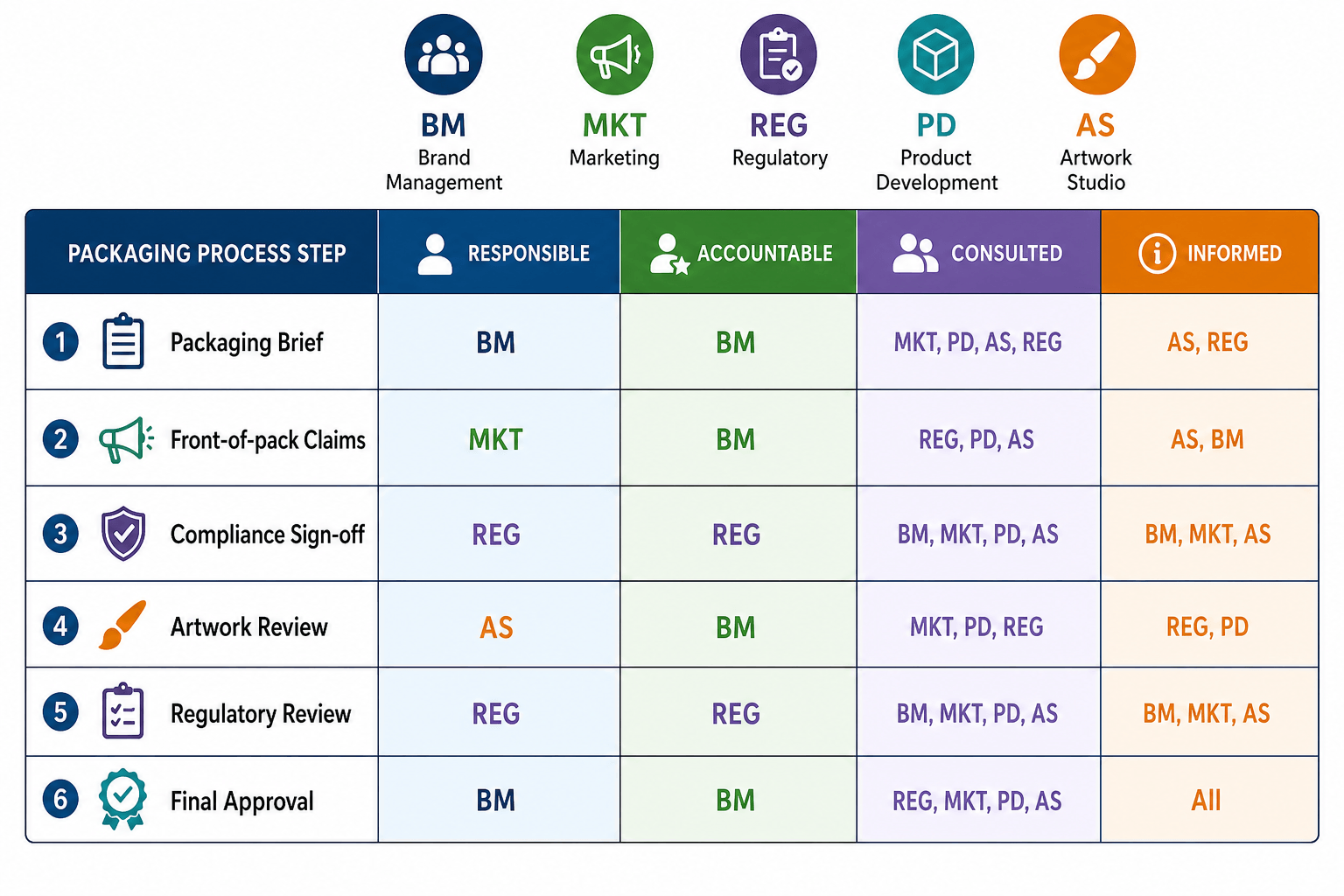
Many brands buy artwork management software, hoping it will fix a slow packaging process. Often it doesn't, because the problem was never the tool. This article explains why automation projects stall and gives you a 20-question checklist to use before you invest.
Key takeaways
- Packaging automation readiness means your data, process, team and systems are prepared for automation before you invest.
- Most packaging automation projects stall because of weak foundations, not because of the technology.
- Automation copies your current process. If the process is unclear, automation makes the problems faster.
- Check four areas before you buy: data, process, organisation and technology fit.
- Fix the basics first, then automate the steps that already work well.
What is packaging automation readiness?
Packaging automation readiness is how prepared your organisation is to automate packaging and artwork work. It covers four areas: the quality of your packaging data, how clearly your process is defined, whether roles and ownership are clear, and whether your current systems can support automation.
A company that is ready can automate tasks like routing, approvals and notifications and get real time savings. A company that is not ready often ends up with an expensive tool that people work around.
At Collabra, we have worked with packaging for more than 20 years and across 600+ artwork programs. We have seen automation projects succeed and stall. The difference is almost always in the preparation.
Why do packaging automation projects stall?
Packaging automation projects stall because the foundation under the technology is not ready. The software may work well, but it is built on top of unclear data, undefined steps and missing owners.
The four most common reasons are:
- Messy data. Product data lives in spreadsheets, emails and people's memory. Automation needs clean, structured data to work.
- Unclear ownership. Nobody can say for sure who approves what. Automation cannot route a file to the right person if nobody knows who that is.
- Undefined process. Every job follows a slightly different path. You cannot automate a process that does not have fixed steps.
- Poor system fit. The new tool does not connect well with existing systems such as ERP or PIM, so people keep doing manual work on the side.
A common warning sign is a process problem that the team has promised to "fix later" for more than a year. If it wasn't fixed manually, automation will not fix it either.
The 20-question packaging automation readiness checklist
Answer each question with yes or no. Every "no" shows an area to fix before, or alongside, an automation project.
Data readiness
- Is your product and packaging data stored in one main system, not spread across spreadsheets and emails?
- Do you use the same naming rules for products and files across all teams?
- Does each product have one unique ID, with no duplicates?
- Is ingredient, nutrition and regulatory data kept up to date in one place?
- Can you find the current approved master for any pack within a few minutes?
Process readiness
- Does every packaging job follow the same basic steps?
- Are those steps written down, not only known by experienced people?
- Is it clear what must be ready before artwork work starts?
- Do you know where most delays in your process come from?
- Do you measure basic KPIs such as cycle time and revisions per artwork?
Organisational readiness
- Does every approval step have one named decision-maker?
- Do people know who owns compliance sign-off for each market?
- Is there a backup approver for when the main approver is away?
- Is there one person responsible for the packaging process as a whole?
- Are the teams who will use the new tool involved in the project from the start?
Technology fit
- Do you know which systems the new tool must connect with, such as ERP, PIM or DAM?
- Can your current systems share data with other tools?
- Do you know which manual tasks take the most time today?
- Have you agreed which tasks the automation should handle first?
- Is there budget and time for training and change management, not only for the software?
How to read your score:
- 16–20 yes: You are likely ready. Focus on choosing the right tool and a clear rollout plan.
- 10–15 yes: You are partly ready. Fix the gaps in your weakest area before or alongside the rollout.
- Under 10 yes: Start with the process and data. Automation now is likely to cause more work, not less.
What should you fix before you automate?
You should fix unclear ownership, undefined process steps and messy data before you automate. These three issues cause the most problems in automation projects, and no tool can solve them for you.
A practical order is:
- Define the process. Agree on the fixed steps every packaging job goes through.
- Assign owners. Make sure every step and every approval has one named person.
- Clean the data. Fix naming, remove duplicate IDs and gather product data in one place.
This does not always need to be finished before you start looking at tools. But it should be planned as part of the project, not left for later.
If your process grew over time without a clear design, our article on artwork operations and the packaging operating model shows how to spot it and where to start.
What should you automate first?
You should automate first the steps that are already clear, repeated often and take a lot of manual time. These give the fastest and most visible results.
Good first candidates are usually:
- Task routing: sending a job to the right person at the right step
- Approval requests and reminders: so nobody has to chase approvers by email
- Status updates and notifications: so people can see where a job is without asking
- Version control: making sure everyone works on the current file
Leave complex or unclear steps for later. Automate them only after they are stable and defined.
How long does an artwork software rollout take?
An artwork software rollout usually takes several months, depending on how ready your data, process and team are. The better prepared you are, the faster and smoother the rollout.
Typical phases include preparation, system setup, integration with existing systems, a pilot with one team or product range, training and full rollout. Delays often come from integrations and from users who were not involved early.
We describe the phases in more detail in our packaging artwork software implementation timeline. If you want to estimate the business value before you invest, see how to evaluate the ROI of your artwork management solution.
How Collabra helps brands prepare for automation
Collabra is a packaging agency based in Gothenburg, Sweden. We help brand owners with packaging strategy, design and production. We have worked inside FMCG packaging operations across many markets, suppliers and printers, which are exactly the places where automation projects tend to break first.
We do not start with software. We start by checking whether your organisation is ready. A packaging automation readiness assessment from Collabra looks at your data quality, process, organisation and technology fit. You get a readiness scorecard and a clear roadmap of what to fix first and what to automate first.
When the foundation is ready, the right technology can deliver real results, whether that is Cway, the platform developed by Collabra, or the artwork management system you already use.
 Tilda Eriksson



 Tilda Eriksson : 2026-10-06 09:45